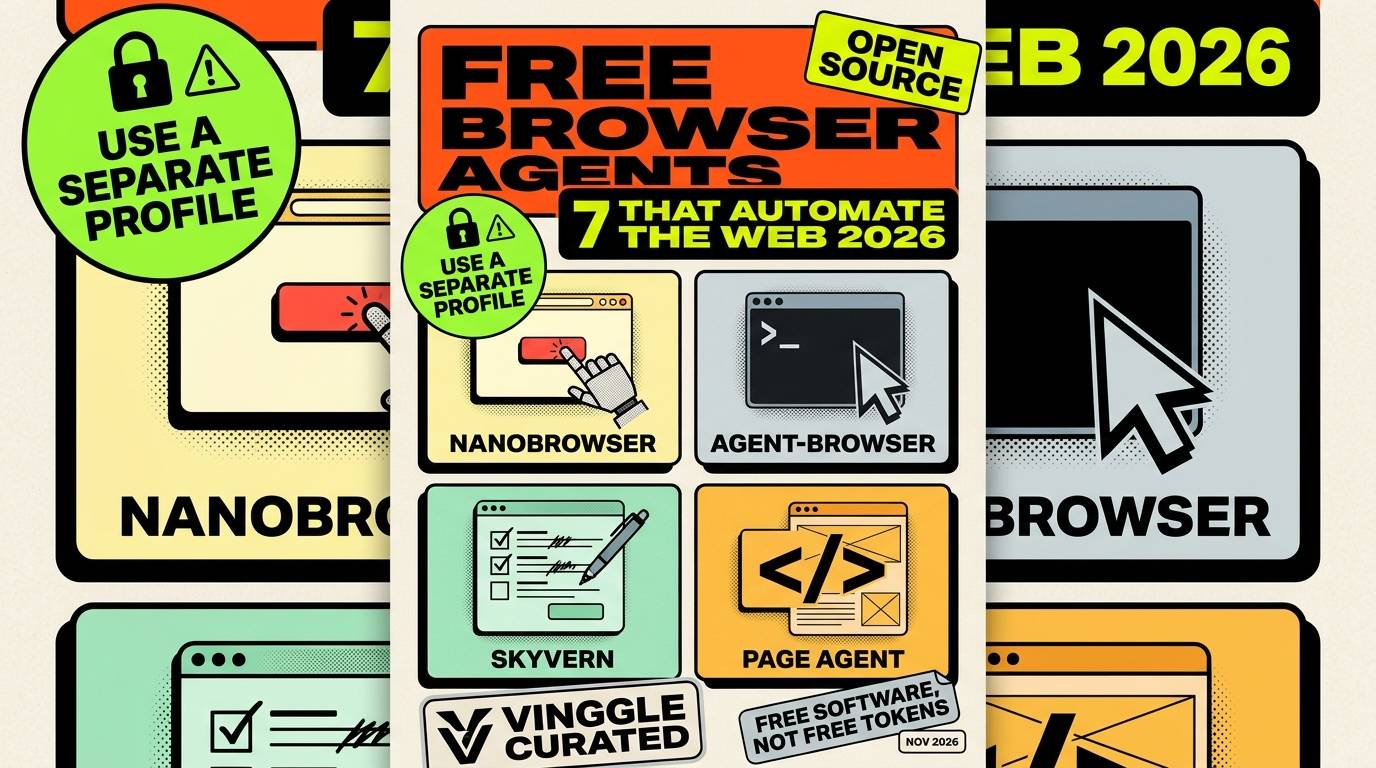
The short answer: the best free open-source browser agents in 2026 are Nanobrowser, BrowserOS, Vercel's agent-browser, Skyvern, Alibaba's Page Agent, Agent S3 and Playwright MCP. Each automates the web in a different way: a Chrome extension, a whole browser, a command-line tool, a vision-based framework, a script you embed in your own site, a desktop agent, and a connector for any AI assistant. The software is free. The AI model that drives it usually is not.
Key Takeaways
- Nanobrowser and BrowserOS are the easiest to try, because they run inside a browser you already know.
- agent-browser and Playwright MCP are built for AI coding assistants rather than for people clicking buttons.
- Skyvern is strongest on form-heavy workflows, but it uses the AGPL-3.0 license, which needs a legal check if you build a product on it.
- Page Agent is different: it lets visitors of your own website drive its interface in plain language.
- Free software is not free tokens. You pay your model provider unless you run a local model, and you should never give an agent a browser holding saved payment details.
Last updated: November 2026. Star counts and versions come from September snapshots and change daily, so treat them as order-of-magnitude figures.
How we compared: we used each project's repository and documentation, GitHub snapshots taken in early September 2026, and independent roundups published through the autumn. We did not run the agents ourselves. Public benchmark tables are mostly run by the vendors, so we do not rank these tools by score.
In This Article
- What "free" really means
- Quick verdict
- 1. Nanobrowser
- 2. BrowserOS
- 3. agent-browser
- 4. Skyvern
- 5. Page Agent
- 6. Agent S3
- 7. Playwright MCP
- Side-by-side comparison
- How to stay safe
- What we left out, and why
- How to test in 15 minutes
- FAQ
What "Free" Really Means
Three different costs hide behind the word. The software license is free for all seven tools. The model that powers the agent is billed by whichever provider you connect, unless you run a local model, which is free but usually less reliable at multi-step web tasks. And several projects also sell a hosted cloud version, which is optional and not what this guide covers.
The practical advice is to start with a cheap cloud model to find out whether the workflow works at all, then decide whether a local model is good enough. For the local route, see our guide to the best free local AI tools.
Quick Verdict
- Easiest start for a non-developer: Nanobrowser, an extension for Chrome or Edge.
- Best "AI browser" you can install: BrowserOS.
- Best for coding assistants: agent-browser or Playwright MCP.
- Best for repeating form workflows: Skyvern, with the license caveat.
- Best for adding an AI helper to your own website: Page Agent.
- Best when the task leaves the browser: Agent S3.
1. Nanobrowser
Nanobrowser is a browser extension for Chrome and Edge that runs a team of cooperating agents inside your own browser. You type a goal, and the agents plan, navigate and click through the page you already have open. It is written in TypeScript, licensed Apache-2.0, and had about 13,700 GitHub stars in the September snapshot.
- Replaces: paid agent features such as OpenAI's Operator-style browsing.
- Cost: free; you connect your own model provider, and its documentation covers local models.
- The catch: it acts inside your real browser session, so it can reach anything you are logged into. Use a separate browser profile.
2. BrowserOS
BrowserOS is a full browser, a fork of Chromium, with the agent built in rather than bolted on as an extension. It can work with local model runners such as Ollama and LM Studio, and it exposes its tools over MCP, so coding assistants can drive it. It is licensed AGPL-3.0 and had about 13,500 stars in the snapshot.
- Replaces: paid AI browsers that bundle an agent.
- Cost: free, plus whatever model you connect.
- The catch: it is a separate browser to adopt, and AGPL-3.0 matters if you modify it and offer it as a service.
3. agent-browser
agent-browser is a native Rust command-line tool from Vercel Labs that gives an AI agent a browser to drive. It reads pages as an accessibility tree with stable element references, returns JSON, and can also run as an MCP server. A background daemon keeps the browser alive between commands. It is Apache-2.0 licensed and was the most-starred tool here in the snapshot, at about 41,900.
- Replaces: hosted browser-automation APIs that charge per session.
- Cost: free; it drives a local Chrome for Testing, or a cloud browser provider if you choose one.
- The catch: it has no agent brain of its own. It is a tool for an assistant such as Claude Code or Cursor to use, not a chat window for you.
4. Skyvern
Skyvern reads pages with a vision model plus the page structure, which helps on sites whose layout keeps changing, and it is strongest on form-heavy workflows such as filling in repeated applications. It is a Python framework built on Playwright. The version in the roundups was v1.0.48, from August 5, 2026, and the project had about 22,900 stars.
- Replaces: paid form-filling and RPA tools.
- Cost: the self-hosted software is free; the company also sells a cloud service.
- The catch: it uses AGPL-3.0, and its anti-bot features are in the cloud offering, not the open code. Internal use is simple, but shipping or hosting it means checking the license first.
5. Page Agent
Page Agent, from Alibaba, works the other way around. Instead of an agent that browses other people's sites, it is a pure-JavaScript agent you add to your own web app with one script tag or an npm package. Your visitors can then type commands such as "click login and fill in the username" and it operates the page. It is MIT licensed, has more than 17,000 stars, and offers allowlist and data-masking options to control what the agent can touch.
- Replaces: paid in-app copilot services for SaaS products.
- Cost: free; you supply your own model connection.
- The catch: it reads the page text, not screenshots, so it cannot handle visual-only interfaces. The public demo runs through a proxy that Alibaba operates for evaluation, so do not send real user data through it in production.
6. Agent S3
Agent S3, from Simular, is an open computer-use agent. It operates the graphical interface of a whole machine, with the browser as one case among many, which makes it useful when a task starts on a website and ends in a desktop app. It is Apache-2.0 licensed and had about 12,000 stars.
- Replaces: paid desktop-automation agents.
- Cost: free, plus the model you connect.
- The catch: controlling a full desktop is a bigger security surface than a browser tab. Run it in a virtual machine or a spare account.
7. Playwright MCP
Playwright MCP is Microsoft's MCP server on top of Playwright. It lets any MCP-capable AI assistant drive a real browser, reading pages as structured snapshots rather than screenshots. It is Apache-2.0 licensed, had about 36,000 stars, and was at version 0.0.79 in the roundups, which signals that it is still moving fast.
- Replaces: paid browsing add-ons for AI assistants.
- Cost: free, plus your assistant.
- The catch: it is a connector, not an agent. The quality of the result depends on the assistant you attach it to.
Side-by-Side Comparison
| Tool | Type | License | Stars (Sept 2026) | Reads pages by | Best for |
|---|---|---|---|---|---|
| Nanobrowser | Chrome/Edge extension | Apache-2.0 | ~13.7k | In-page, multi-agent | Beginners |
| BrowserOS | Chromium fork | AGPL-3.0 | ~13.5k | Built-in agent, MCP tools | An AI browser |
| agent-browser | Rust CLI | Apache-2.0 | ~41.9k | Accessibility tree | Coding assistants |
| Skyvern | Python framework | AGPL-3.0 | ~22.9k | Vision plus structure | Form workflows |
| Page Agent | Embeddable script | MIT | 17k+ | Page text (DOM) | In-app copilots |
| Agent S3 | Desktop agent | Apache-2.0 | ~12k | Screenshots of the GUI | Tasks beyond the browser |
| Playwright MCP | MCP server | Apache-2.0 | ~36k | Structured snapshots | Any MCP assistant |
How to Stay Safe
A browser agent reads web pages and then acts, which makes it vulnerable to prompt injection: a malicious page can hide instructions that try to hijack the agent. Treat any agent connected to your real accounts as a risk and follow these rules:
- Use a separate browser profile with no saved passwords or payment methods.
- Restrict where it can go. Use allowlists where the tool offers them, as Page Agent does.
- Keep a human approving purchases, emails and deletions.
- Do not paste secrets into prompts that the model provider will receive.
- Review logs after a run, especially on sites you do not control.
What We Left Out, and Why
- browser-use: the most adopted open-source browser agent by a wide margin, with roughly 108,000 to 112,000 stars, an MIT license and the top spot on the Odysseys leaderboard at 87.4% in August 2026. It is the obvious pick and in every roundup, so we left it out to cover others. Start there if you want the largest community.
- Stagehand: a respected TypeScript option for developers who want AI steps inside Playwright code, but it also appears in every roundup.
- browserbase/open-operator: a template that was archived on May 20, 2026. Check a project's status before building on it.
One more caution: benchmark tables for these tools are not comparable. In one published comparison, the tools were tested on different numbers of tasks and under different conditions, with the leader running locally on clean IP addresses while another ran in the cloud against live bot protection.
How to Test in 15 Minutes
- Pick one boring, safe task you repeat, such as collecting prices from a public page.
- Use a throwaway browser profile with no logins.
- Start with Nanobrowser or BrowserOS for a visual test, or agent-browser if you work with a coding assistant.
- Run the task three times and note how often it succeeds, how long it takes and how many tokens it uses.
- Only then try it on a task that touches a logged-in account, with an approval step.
Frequently Asked Questions
What is the best free open-source browser agent?
It depends on what you need. Nanobrowser is the easiest to start with, agent-browser and Playwright MCP suit coding assistants, and Skyvern suits repeated form workflows.
Are open-source browser agents really free?
The software is free. You pay for the AI model that drives it unless you run a local one, and some projects sell optional hosted versions.
Is there an open-source version of OpenAI's Operator?
Not an exact clone, but several open agents do much of the same job, including Nanobrowser, Skyvern and browser-use.
Which license should I worry about?
AGPL-3.0, used by Skyvern and BrowserOS, adds obligations if you modify the code and offer it as a service. MIT and Apache-2.0 are the simplest for commercial use.
Is it safe to let an agent use my browser?
Only with precautions. Use a separate profile, avoid saved payment details, limit the sites it can visit and approve sensitive actions yourself.
For business-focused agents and no-code automation, see our guide to the best AI agents for business and browse more in Vinggle's Automation Tools directory. If you build an agent or automation tool, submit it to Vinggle.